- Navigate to the Globus File Manager' on globus.org and select the subdirectory you want to share. Click on the 'Share' button in \
the right side pane.
- Click on 'Add a Guest Collection'
- Leave the Path unchanged. Add a Display Name and a Description (optional) and click 'Create Share'.
- Now you will want to share it with other Globus users. Click on 'Add Permissions - Share With'
- You can choose to share with other Globus users by selecting their email address,
Globus username, or name. You can search with a name, or an email address. Select the user you want to share with.
- You can select 'Send Email' (default) and enter a message that your colleague will receive.
By default, only read access to the directory ia provided. If you wish your colleague to transfer data into the directory, you can a\
lso provide
write access by checking the 'write' button. Once the options have been selected, click 'Add Permission'.
- You should then see the share and the people you have shared it with. You can repeat this process for any number of collaborators\
.
At any time, you can revoke access for a particular person by clicking the trash can next to the invitee in the last image above.
To see all endpoints you have shared, go to 'Endpoints' in the left bar, then 'Administered by You'.
It is highly recommended that you delete the shared endpoint when your collaborator has completed downloading the data.
What to tell your collaborators
If you set up a shared endpoint and want your collaborator to download the data, this is what you need to tell them.
First, the collaborator needs to get a Globus account. The instructions for setting up a Globus account are
as described on our webpage above. This account is free. They may already
have Globus access via their institution.
If the collaborator is downloading the data to his/her personal workstation, they need to install
the Globus Connect client. Globus connect clients are available for Mac, Windows or Linux systems and are free.
When you share data with your collaborator, they will receive an email from Globus which contains a link.
They should click on the files they want to transfer, then 'Transfer or Sync to', enter their own endpoint name and desired path.
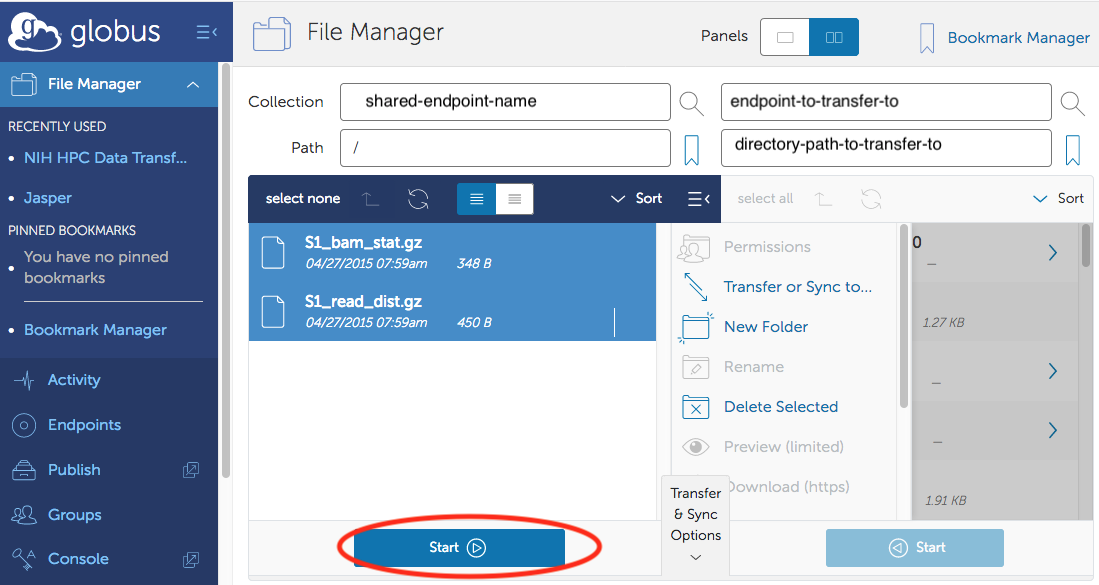
and click the 'Start' button near the bottom to start the transfer.
Deleting a shared endpoint
Once your data transfer or project is complete, and you no longer need to share data with your collaborator, you should delete the shared endpoint
that you had created. This helps to ensure that you do not inadvertently put data into a directory that you had shared in the past and forgotten about, so that your data is now being shared without your conscious knowledge.
- Go to https://app.globus.org/endpoints.Select the 'Administered by You' tab.
- You should see a list of all the shared endpoints you have created. Click on the right-arrow next to the endpoint you want to delete.
- On the resulting page, you can check who you have shared it with (the 'Permissions' tab), or delete the endpoint.
 See the links in the Quick Links menu at left for details.